
Check Western Media Bias Instantly
Overview
The "Western Media Checker" browser extension is designed to help users assess the credibility and political leanings of major Western news outlets in real time. By providing quick access to bias and reliability ratings, the tool aims to support informed media consumption in an era of information overload. It is particularly useful for individuals seeking to identify potential editorial slants when reading news articles online.
Developed by the WeChat public account "News Lab" (newslab), the extension reflects a growing public interest in media literacy and transparency. The project is led by Fangcheng Fang, a doctoral candidate in Communication at the University of Pennsylvania, and supported by a team including Wu Peilin, Nicole Zhou, Lu Fangzhu, and Li Shuhang. The extension is part of a broader initiative to promote critical thinking around news sources.
Real-world usage scenarios include verifying the neutrality of a news report before sharing it on social media, evaluating the reliability of sources cited in academic work, or simply understanding how different outlets frame the same event. The tool is intended for general users, students, researchers, and anyone interested in media transparency. It operates as a lightweight browser add-on, requiring no installation beyond standard extension procedures.
Key Features & Capabilities
- Real-time Media Bias Indicators – Displays visual indicators of a news outlet’s political leaning and reliability when visiting its website.
- Source Transparency – All data is drawn from publicly available sources including Wikipedia, Allsides.com, MediaBiasFactCheck.com, and original research by the project’s lead.
- Quick Access via Browser Icon – Users can check a media outlet’s profile with a single click on the extension icon.
- Regular Updates – The database is maintained and updated by the development team to reflect changes in media coverage and public perception.
- Feedback Mechanism – Users can report inaccuracies or suggest improvements via email to [email protected].
These features enable users to make informed decisions about the sources they consume. For example, when reading a headline from a major outlet, a user can instantly determine if the source is considered left-leaning, right-leaning, or neutral. This helps reduce reliance on potentially biased narratives and supports a more balanced understanding of current events.
User Interface, Workflow & Performance
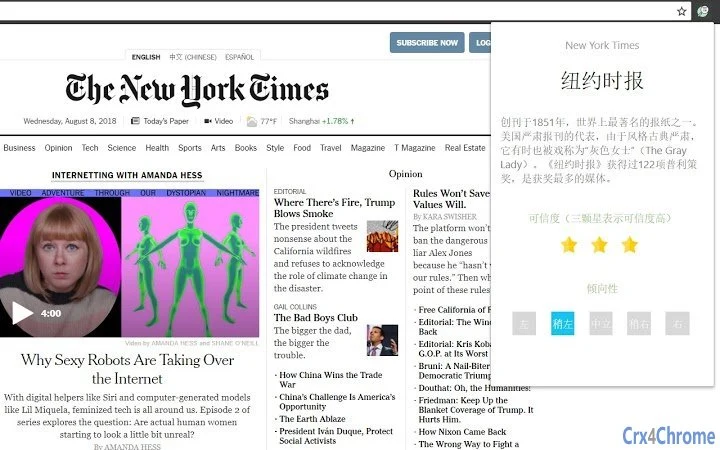
The extension features a clean, minimal interface designed for immediate usability. Upon clicking the icon, a compact panel appears, displaying key information such as the outlet’s name, bias rating, and reliability score. The layout is optimized for quick scanning, with color-coded indicators to denote political leanings and credibility levels.
Navigating the extension is straightforward, requiring no learning curve. The workflow is seamless: visit a news site → click the extension icon → view bias and reliability data. No additional steps or logins are required.
Performance details were not specified by the developer. However, given its size of 2.5 MB and the nature of browser extensions, it is expected to operate efficiently without significantly impacting browsing speed or system resources. The developer did not provide additional system requirements or resource usage details. Stability is assumed to be consistent with standard browser extension behavior.
Compatibility & System Requirements
The extension is compatible with both Windows and Mac operating systems. It supports major browsers through standard extension platforms, though specific browser names were not listed in the provided information. The installation size is 2.5 MB, which is minimal for a functional browser tool.
Exact system requirements were not listed. Compatibility information was partially provided, indicating support for desktop environments. The developer did not specify minimum CPU, RAM, or storage thresholds. Users should ensure their browser is up to date to maintain full functionality.
Pros and Cons
Pros
- Provides immediate insight into media bias and credibility
- Backed by multiple reputable sources and academic research
- Lightweight and fast, with minimal system impact
- Free to use with no hidden costs
- Encourages media literacy and critical thinking
Cons
- Relies on third-party data sources that may have their own biases
- Does not offer historical trend analysis of media bias
- Limited to Western media outlets as defined by the project
- Updates depend on manual maintenance; no automated refresh mechanism described
- Feedback process requires email, which may delay issue resolution
FAQ Section
Is the extension free to use?
Yes, the extension is available at no cost. There are no subscription fees or in-app purchases.
Which browsers are supported?
The extension is compatible with Windows and Mac systems. Specific browser compatibility was not provided, but it is designed to work with standard browser extension platforms.
How is the media bias data collected?
Data is sourced from Wikipedia, Allsides.com, MediaBiasFactCheck.com, and original research conducted by the project’s lead, Fangcheng Fang.
Can I contribute to the project?
Yes, the team welcomes suggestions and contributions. You can contact them at [email protected].
Is the extension secure?
As a browser extension, it operates under standard security protocols. The developer did not provide detailed security audits, but it is distributed through official channels and does not request sensitive permissions.
Final Thoughts + CTA
The "Western Media Checker" extension offers a practical, accessible tool for navigating the complex landscape of Western media. By delivering quick, data-backed insights into bias and reliability, it empowers users to approach news with greater awareness and skepticism. Its transparent sourcing and academic foundation lend credibility to its assessments.
While not a perfect solution—its scope is limited to Western outlets and relies on third-party data—the extension fills a critical gap in digital literacy. It is especially valuable for students, journalists, researchers, and everyday readers who want to verify sources without leaving their browser.
With its lightweight design, free access, and commitment to transparency, this tool stands out as a reliable ally in the fight against misinformation. Download Western Media Checker now.







